AI Consultation for Doctors – Streamline Your Clinical Workflow
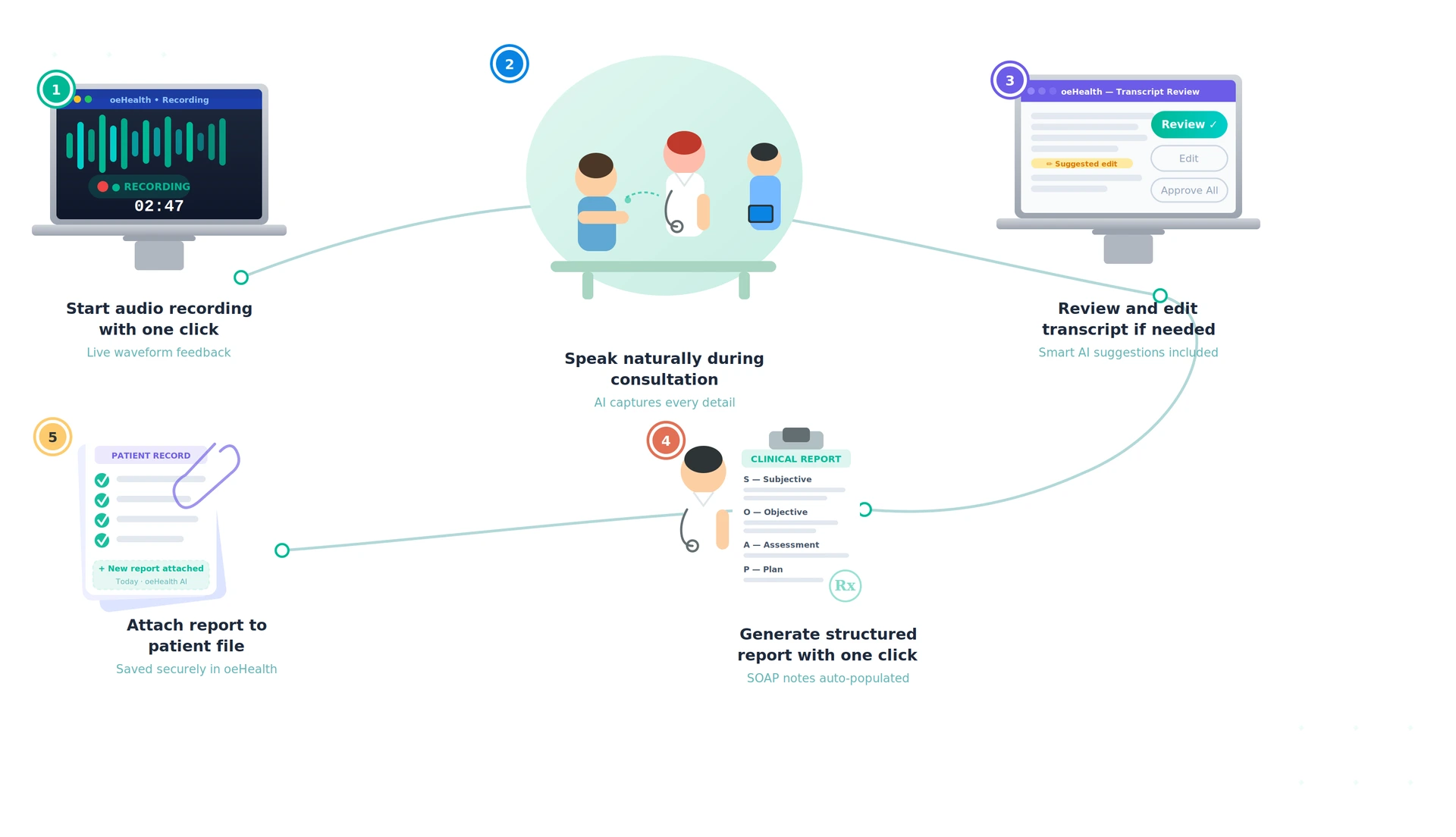
Speak. Record. Let AI handle the rest. With AI Consultation for Doctors by oeHealth, clinicians can record voice consultations, instantly transcribe them using OpenAI Whisper, and generate structured medical reports with GPT. Focus on patient care while AI manages your clinical documentation efficiently.
Voice Recording
Record Consultations Without Disrupting the Visit
Enhance patient care with AI voice Consultation. Record consultations directly from appointments, patient records, or clinical encounters without disrupting the visit. Our built-in recorder captures every conversation securely, eliminating external apps, file transfers, and wasted time making clinical documentation effortless and accurate.
Multi-Language Support
Record in English, Spanish, French, Arabic, Hindi, Gujarati, Tamil, and many more languages. Whisper transcribes accurately regardless of the source language, with output always in English.
Dual Transcription Engine
OpenAI Whisper handles transcription by default. If it fails, Google Speech API kicks in as an automatic fallback — so you never lose a consultation recording.
Auto-Generated PDF Reports
Every AI analysis produces a professional PDF report with your company logo, patient demographics, and structured clinical findings — automatically attached to the appointment.
AI-Powered Clinical Intelligence
Beyond transcription, oeHealth AI transforms voice recordings into actionable clinical intelligence across every stage of the patient encounter.
Patient Assessment Summary
AI extracts chief complaints, symptoms timeline, pain assessment, and functional impact from the consultation — structured and ready for the medical record.
- Chief complaint extraction
- Symptoms timeline mapping
- Pain and severity scoring
Clinical Decision Support
GPT analyzes the transcription to suggest differential diagnoses, identify risk factors, and recommend diagnostic tests — assisting doctors, not replacing them.
- Differential diagnosis suggestions
- Risk factor identification
- Diagnostic test recommendations
Treatment Plan Generation
AI documents medications, dosages, non-pharmacological treatments, and monitoring plans mentioned during the consultation — structured and actionable.
- Medication documentation
- Dosage and frequency capture
- Monitoring plan extraction
Follow-Up Coordination
Identifies follow-up appointments, specialist referrals, pending diagnostic tests, and care team communications from the recorded conversation.
- Next appointment extraction
- Specialist referral detection
- Pending test identification
Patient Education Analysis
AI evaluates how well conditions and treatments were explained, identifies patient questions, and assesses communication effectiveness during the visit.
- Education quality scoring
- Patient question tracking
- Communication effectiveness
Cost Tracking and Budgets
Monitor API usage costs per transcription and analysis. Set monthly budget limits, track cumulative spending, and get alerts when approaching thresholds.
- Per-operation cost tracking
- Monthly budget limits
- Spending alerts
AI Voice Consultation vs. Manual Documentation
See how AI-powered voice consultation transforms clinical documentation compared to traditional note-taking.
| Workflow | With oeHealth AI | Without oeHealth AI |
|---|---|---|
| Clinical Documentation | Speak naturally, AI documents | Type during consultation, lose eye contact |
| Consultation Notes | Structured and complete in seconds | Handwritten or typed after the visit |
| Patient Assessment | AI extracts and organizes findings | Doctor manually writes assessment |
| Treatment Plans | Auto-documented from discussion | Manually created after consultation |
| Multi-Language Support | Multiple languages, output in English | Documentation only in doctor's language |
| Report Generation | Professional PDF in one click | Manual report writing, formatting |
| Data Accuracy | Nothing missed from conversation | Memory-dependent, details lost |
| Doctor Productivity | More patients, less paperwork | Hours spent on documentation daily |
Frequently Asked Questions
Answers to the most common questions from healthcare administrators and clinical leaders about AI voice consultations.
Which AI models power the transcription and analysis?
Transcription uses OpenAI Whisper (with Google Speech API as automatic fallback). Clinical analysis uses OpenAI GPT — you can choose between GPT-4o Mini (recommended for cost-efficiency), GPT-4o (premium accuracy), or GPT-3.5 Turbo (budget option). All models are configurable from the admin panel.
What languages can doctors record in?
oeHealth AI supports multiple languages including English, Spanish, French, German, Arabic, Hindi, Gujarati, Tamil, Telugu, Kannada, Malayalam, Marathi, Punjabi, Japanese, Korean, Chinese, Russian, Portuguese, Italian, and more. Regardless of the source language, all AI analysis output is generated in English.
How much does it cost per consultation?
Costs vary by audio length and GPT model. GPT-4o Mini keeps costs very low — typically a few cents per consultation. The system tracks every API call with exact costs, shows monthly spending, and lets you set budget limits with alerts so you're never surprised.
Can we customize the AI analysis prompts?
Yes. The system comes with pre-built medical analysis prompts covering patient assessment, clinical decisions, treatment plans, follow-up coordination, and patient education. You can customize any of them or create entirely new prompts with dynamic variables for patient demographics, appointment details, and physician information.
Is the AI analysis a replacement for the doctor's clinical judgment?
No. oeHealth AI is a documentation and decision-support tool, not a diagnostic system. It structures what the doctor said, suggests possibilities to consider, and saves documentation time — but every clinical decision remains with the physician. Think of it as an intelligent scribe, not a second opinion.
Let AI Handle the Paperwork
Doctors spend up to 2 hours daily on clinical documentation. oeHealth AI gives that time back — record, transcribe, analyze, and generate reports in seconds. See it in action.
Free demo. No commitment. See results in your first week.